Case Studies
We Replaced 200 Hours of LinkedIn Research with a 2-Hour Enrichment Agent
How we enriched 400+ VC contacts in 2.2 hours using Explorium, Notion, and Pipedream. 95% match rate for major firms, 98% time reduction.

Veronica Picciafuoco
Founder, Eldur Studio
- Published
- Reading time
- 2 min read
We replaced 200 hours of LinkedIn research with a 2-hour automation. Here's how.
A venture firm needed to enrich and verify hundreds of investor and firm records inside Notion. The team was spending days cross-referencing contacts, chasing down company websites, and copy-pasting funding data from multiple sources. They evaluated investment CRMs that promised enrichment, but the reality was a rigid workflow that did not match how the team worked.
In short: we enriched 400+ VC contacts in 2.2 hours using Explorium + Notion + Pipedream, with a 95% match rate for major firms.
The approach
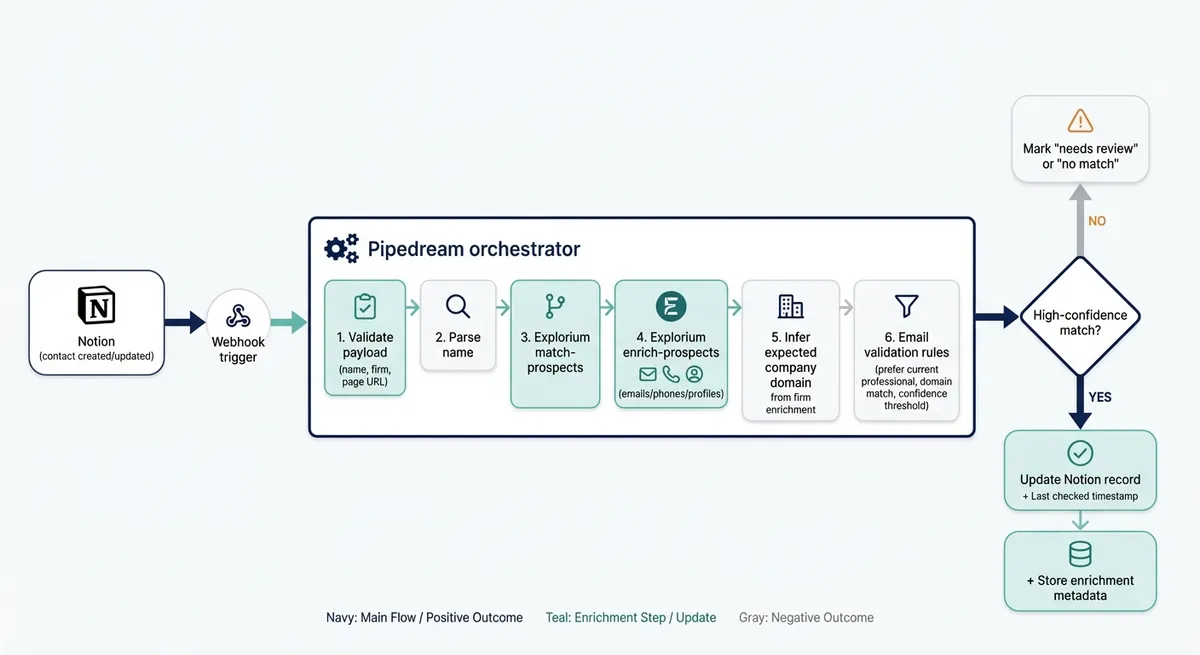
We kept Notion as the system of record and built an enrichment layer on top using Explorium's API, orchestrated through Pipedream.
The system ran four small agents, each with one job: match the prospect, validate the email, orchestrate the workflow, and write the results back to Notion. We batched 3–5 records at a time for stability and tracked everything with audit trails and last-checked timestamps.
The MCP connection to Claude was the surprise win. I could read and write data directly in Notion without mapping fields. What would normally take an hour of field-by-field configuration became a conversation.
We learned the batch size the hard way. Our first run tried 20 records at once, the MCP connection dropped mid-enrichment, and we spent an hour figuring out which records actually got written back. After that, 3–5 became a hard rule.
Running this kind of workflow inside Notion instead of on an external runner is a real tradeoff — we compared both in Notion AI Agents vs. Cowork.
Results
Large, well-known firms: 95%+ match rate
Mid-size funds ($100M–$1B AUM): 70–80% match rate
Smaller funds / international contacts: 40–60% match rate
Time savings: ~15–30 min per contact manually × 400 contacts = 100–200 hours. Automated: ~2.2 hours. 98% reduction.
Instead of chasing down company websites or guessing at funding data, the CRM now updates itself.
Why Explorium
Honestly, the playground is what sealed the deal. We loaded the client's actual records, ran a test enrichment, and could see match rates before writing a single line of automation code. That's rare. Most providers want you to commit before you can evaluate quality.
With so many company/people data providers out there, Explorium felt refreshingly straightforward.
Full case study
For the complete architecture breakdown, comparison table (Explorium vs. Crunchbase vs. PitchBook), workflow diagram, and FAQs, read the full case study:
→ How We Built a Lead Enrichment Agent with Explorium and Notion
- AI Agents
- Automation
- Notion
Keep reading
More field notes
 Case StudiesThe Webflow Pro System: A mini-CRM born from Real Agency WorkAfter five years running a Webflow consultancy, I built a Notion system to replace six tools. Here's what it does and why I'm sharing it.3 min
 Webflow/No-CodeWebflow SEO checklist: what to check every weekA practical Webflow SEO checklist for broken links, alt text, metadata, images, and redirects, with a staging-first workflow for recurring maintenance.6 min
 AI & AutomationWebflow MCP 2.0: game changing releaseIn April the Webflow MCP couldn't duplicate a carousel slide. 2.0 fixed that and moved almost everything off the Designer. Here's what it does, and the one gap you have to build yourself.4 min
Next step
Ready to build AI workflows for your team?
Most teams start with a First Agent, so you see real output before committing to a bigger system.
