Skip to content

Case Study · CRM Automation

Lead Enrichment Agent with Explorium and Notion

We replaced 200 hours of LinkedIn research with a 2-hour automation. A venture firm needed to enrich and verify hundreds of investor records. Here's exactly how we built it.

time reduction
98%time reduction
contacts enriched
400+contacts enriched
total runtime
2.2 hrstotal runtime
match rate (major firms)
95%match rate (major firms)
Lead Enrichment Agent with Explorium and Notion: 98% time saved, 400+ contacts, 2.2 hours

The problem

A relationship database that couldn't keep up

The client needed to keep a large investor relationship database accurate across multiple systems: email, calendar, spreadsheets, and finance. The database had common failure modes that compounded over time:

  • Missing or outdated firm websites
  • Unverified emails that bounced on outreach
  • Inconsistent company names and domains
  • Manual enrichment that never kept up with volume

They evaluated investment CRMs that promised enrichment, but the reality was a rigid workflow and a schema that didn't match how the team actually worked.

The ask: keep Notion as the system of record, and make the data stay current without manual effort.

Stack decisions

Why Notion. Why Explorium.

System of record

Why Notion

We build a lot of CRMs in Notion because it's flexible, fast to evolve, and easy to adopt. The native AI lets you search with natural language: “When's the last time we talked to Investor XYZ and what did we discuss?” instead of applying filters and scanning rows.

The gap: Notion doesn't come with deep company intelligence by default. This client needed funding events, validated domains, and high-confidence contact details inside their existing workspace, not a migration.
Enrichment layer

Why Explorium

The MCP connection to Claude was the surprise win. I could read and write Notion data without mapping fields. What would normally take an hour of configuration became a conversation.

  • Strong coverage: company info, funding events, contact details
  • Better matching than “domain only”: infers the right company from partial inputs using fuzzy logic
  • A usable playground: we tested on real records before writing any automation code
  • Statistics endpoint: estimates query size before you commit to a run
  • Credit-based pricing that scales without surprise invoices

Architecture

What we shipped

Four agents, each responsible for exactly one job. An orchestration layer keeps execution reliable across the full batch.

  1. Agent 01

    Prospect Matching

    Looks up the right person from name + company, even with spelling variations or aliases. Returns a stable ID used for every enrichment step.

  2. Agent 02

    Email Validation

    Picks the best current work email when multiple results come back. Checks domain matches expected company. Flags low-confidence results for human review.

  3. Agent 03

    Orchestration (Pipedream)

    Runs multi-step workflows in order. Handles batching and retries automatically. Tracks what already ran so partial failures don't restart from scratch.

  4. Agent 04

    Notion Update

    Writes enriched data back into Notion. Stamps each record with a last-checked date. Keeps an audit trail: what changed, when, and how confident the match was.

In the workflow

The trigger sits where the team already works

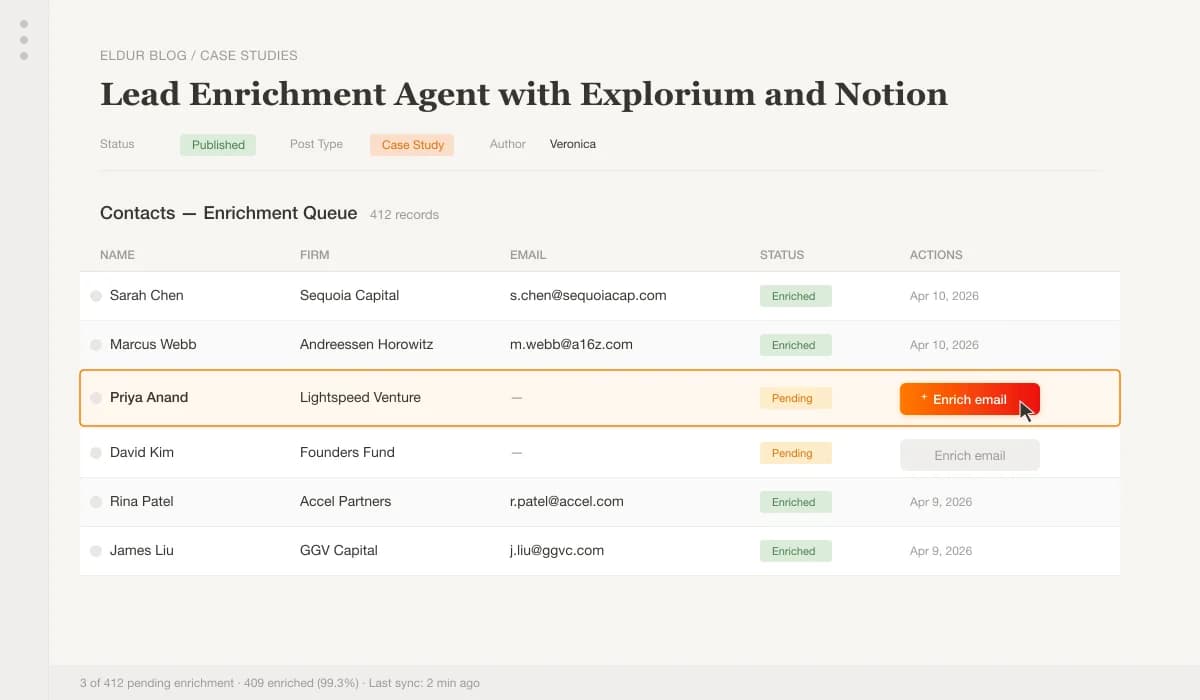
This is the exact table view the client uses inside Notion. We turned enrichment into a single obvious action instead of another buried admin workflow.

Notion CRM · enrichment queue
Notion CRM table showing the Enrich email button that triggers the enrichment agent for each contact
Desktop gets the full queue. Pending rows stand out, and one button starts enrichment from the row itself.
  1. 1Pending records are visually separated so the next action is clear.
  2. 2The button launches enrichment from the contact row itself.
  3. 3Status and last-run data are written back into the same queue for easy review.

Key workflow

Email enrichment: 400+ contacts

A typical run, step by step. Each step either produces a result or marks the record for human review. No silent failures.

  1. 01

    Notion triggers on record create/update. The webhook fires as soon as a new contact is added or an existing one is flagged for refresh.

  2. 02

    Validate inputs. Check that name, firm, and Notion page URL are present. Skip and log any incomplete records rather than failing the whole batch.

  3. 03

    Match the prospect. Name + company → stable Explorium ID. Handles aliases, maiden names, and common misspellings.

  4. 04

    Enrich prospect data. Pull verified emails, phone, LinkedIn profile, and any public activity signals.

  5. 05

    Infer expected domains from firm enrichment. Cross-reference the contact's email domain against the firm's known domains to catch role changes or aliases.

  6. 06

    Select the best email. Apply validation rules: prefer work email, check domain match, reject anything below confidence threshold.

  7. 07

    Update Notion or mark “no match”. Write the enriched fields back. If no match found, set a status property so the record is easy to filter and review.

  8. 08

    Store enrichment metadata. Log last-checked date, match confidence, and which fields changed. Gives the team full visibility into data freshness.

Results

What the numbers looked like

95%+Match rateLarge, well-known firms. Mid-size funds ($100M–$1B AUM): 70–80%. Smaller/international: 40–60%.
~20sPer contactFull workflow, webhook to Notion update. Single match + enrich: 2–3 seconds. Batch of 5: 8–12 seconds.
98%Time reductionManual: 15–30 min × 400 contacts = 100–200 hrs. Automated: ~20 sec × 400 contacts = 2.2 hrs.

What changed for the client

Instead of chasing down company websites or guessing at funding data, the CRM now updates itself. Automation is smoother, and the database is always one step ahead. The team went from “who has time to clean this?” to running enrichment as a background task, no babysitting required.

Tool evaluation

How Explorium compares

This reflects our experience during the build. We recommend verifying current capabilities directly with each provider, since these things change.

CapabilityExploriumCrunchbase APIPitchBook API
Email enrichmentVerified professional + personalLimited contact infoNone
Batch processing40+ prospects per callSequential lookupsUnknown
MCP supportYesNoNo
Real-time eventsFunding, hiring, acquisitionsDelayed updatesUnknown
Flexible matchingName + company, email, phoneUUID-based onlyUnknown
Pricing modelCredit-based (scales, budget-friendly)Per-call (expensive at scale)Expensive per-seat annual license

Common questions

FAQs

What is Notion data enrichment?

It's the process of adding richer, more useful business data, like company websites or funding details, to your Notion CRM records, usually via API integration. Instead of looking up each record manually, you connect an enrichment provider that fills in the fields automatically.

How does Explorium help with CRM data?

Explorium's API connects to individual records and fills in important company and contact details without manual research. We used custom buttons in the Notion UI to give the client the ability to manually trigger enrichment for a single record, and more sophisticated looping logic to process multiple records in bulk overnight.

Is it complicated to set up?

It's an advanced use case, but if you're already using API-based automations in Notion with an orchestrator like Zapier, n8n, Make, or Pipedream, adding Explorium is quick and straightforward. The main complexity is the batching logic and the field-matching rules. That's where most of the time went.

Who should consider this integration?

If you have a Notion Business plan and use it to manage relationships, Notion with enrichment becomes genuinely competitive with established CRMs, with a UI that's entirely flexible to how your company works. Especially powerful if you've connected your email to Notion AI, since you can then search across enriched contacts and email history together.

What this demonstrates

You don't need to leave Notion to get better data

If you already use Notion for relationships and internal context, you don't need to migrate to a different CRM. You need an enrichment layer that is:

  • Programmatic, not dependent on someone's calendar
  • Auditable, with a full trail of what changed and when
  • Safe to run at scale, with batching, retries, and partial failure handling
  • Designed around your schema, not a vendor's

That's where agentic enrichment workflows earn their keep.

For a behind-the-scenes walkthrough of this specific build, read We Replaced 200 Hours of LinkedIn Research with a 2-Hour Enrichment Agent

For Explorium's version of the story, read Eldur Studio Case Study: A 98% Faster Approach to Lead Enrichment

Next step

Want something like this for your CRM?

Most teams start with a First Agent, so you see real output before committing to a bigger system.

Made with Modulify